


Klover - Instant Cash Advance
4.651.95K Reviews
App Specs
- Version
- 2026.12.0
- Updated On
- License
- Free
- Downloads
- 5,000,000+
- Developer
- Klover Holdings
- Categories
- Finance
- Platform
- Android, iOS
Screenshots

 Analysis by AppCompare
Ever found yourself in a bit of a financial pinch and wished you could just get an advance on your paycheck without jumping through hoops? Well, that’s exactly where Klover - Instant Cash Advance comes in handy. It’s like a financial superhero for those moments when your wallet’s feeling a little light.
When a quick advance is the point
I’d think of Klover as a possible bridge between a small, urgent expense and your next payday, not as a way to increase what you can afford month after month. That distinction matters. An advance moves money forward; it doesn’t create new income, and the repayment can leave less room in the next pay period. I’d only request money for a specific need that I can already see how to cover later.
For example, imagine a necessary household item breaks a few days before payday, while the cash set aside for bills is already spoken for. An advance might help with that immediate gap. I’d first check whether delaying the purchase, using savings, or asking a bill provider about a due-date change would be less costly or stressful. If those options don’t fit, a cash advance may be worth considering, provided the payback won’t trigger another shortfall.
This is where the app’s intended audience is clearest: someone with a regular incoming paycheck who occasionally needs help timing expenses. It’s a weaker fit for a person whose income is unpredictable, whose essential bills already exceed their income, or who needs a large amount to solve a lasting financial problem. In those situations, a budget review, creditor conversation, or local support service may be more useful than borrowing against the next pay cycle.
What to check before relying on timing
“Instant” can set an expectation that money will be available at once, but I wouldn’t plan an urgent payment around a phrase alone. The published app details describe a payday advance, while the experience of requesting one can depend on the account setup and the steps shown inside the app. I’d complete registration before an emergency, review the amount and timing displayed for my own account, and leave a buffer if a payment deadline is close.
That preparation is a practical advantage even if you never request an advance: it lets you learn the flow when you’re calm instead of trying to solve a problem under pressure. I’d also read each confirmation screen carefully, especially the repayment date and any optional choices presented during the request. A fast tap-through is easy when money feels urgent, but a few seconds spent checking the details can prevent a mismatch with your budget.
It’s also sensible to separate “requesting” from “receiving” in your planning. An app can make the request process feel simple without guaranteeing that funds will arrive at the exact moment you need them. If a late fee or missed appointment would be especially damaging, I’d pursue a backup plan rather than treating any advance app as the only route.
Worth Reading Before You Choose

EA SPORTS FC Mobile 26 Is a Bigger Football Game, but It Takes Time

Flipboard Shows What News Apps Must Do Beyond the Feed

Switching to Android Auto Means Rethinking Your Driving Routine

Google Calendar Makes a Crowded Week Easier to Manage

Ludo King Makes the Most of the Minutes Between Plans

Baby Panda World Brings Quick Play to Modern Phones, but Its Game Library Feels Busy
Trade-offs that show up with repeated use
The rewards activities described in the original experience may make the app feel more engaging, but I’d judge them by the time they take and the value I actually get. Surveys and videos are not free in the broad sense if they consume attention, and I wouldn’t count points as money until I could see how they apply to an advance. A useful habit is to compare the effort with the cash benefit before making those activities part of a routine.
I’d be cautious about turning rewards into a reason to open a borrowing app every day. If the goal is to keep finances steady, tracking upcoming bills and setting aside even a small amount when possible is more durable than trying to earn access to another advance. Klover may help with a temporary timing issue, but the rewards element shouldn’t obscure the central question: can I comfortably manage the repayment?
Compared with a credit card, an advance can be more focused on a short pay-cycle gap, while a card may offer a payment window but can carry interest if a balance remains. Compared with a bank overdraft, the costs and rules may differ, so I’d check the terms of both rather than assuming one is automatically cheaper. Asking an employer about a pay schedule or using an existing emergency fund can be better still, because those choices don’t necessarily create a new amount to repay from the next paycheck.
What’s the Deal with Klover?
So, here’s the scoop: Klover lets you snag a cash advance from your upcoming paycheck without any of the usual hassle of credit checks or insane interest rates. It’s designed for anyone who occasionally finds themselves short on cash before payday. The app is all about making your life easier with a quick and simple process.
Getting Started
Jumping into Klover is pretty straightforward. You just need to download the app from the App Store or Google Play, sign up, and connect your bank account. Don’t worry; they use bank-level encryption, so your data is safe. Once you’re in and your account is set up, you’re good to go.
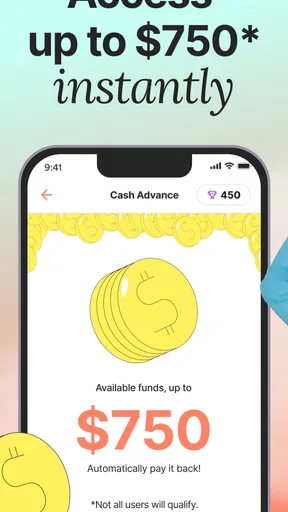
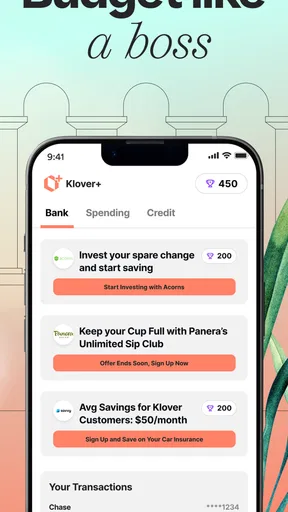
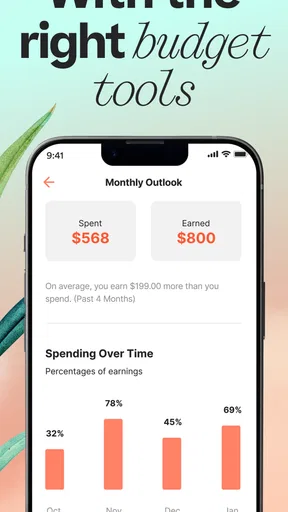
The app is quite user-friendly, with a clean interface that guides you through each step. You can easily check your available cash advance amount and track your spending. It’s like having a personal finance assistant right in your pocket.
Features That Stand Out
One of the coolest features is the lack of fees for requesting an advance. Unlike traditional payday loans, there are no hidden charges that’ll sneak up on you. You simply pay back the advance on your next payday, which you can do directly through the app.
Another nifty aspect is the rewards program. By engaging with the app—like watching videos or completing surveys—you earn points. These points can be redeemed for more cash advances, which is a fun little perk that makes using the app feel rewarding.
Real-Life Use
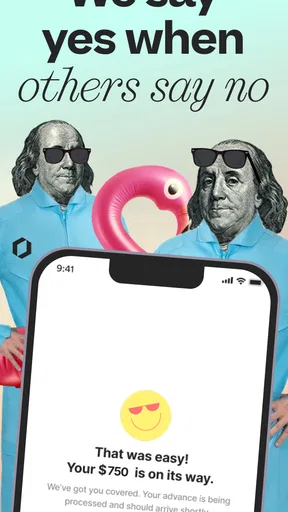
Now, let’s talk about what it’s like using Klover in the real world. Say you’ve got an unexpected bill or a sudden expense that you just can’t cover until your next payday. Instead of stressing out, you just open Klover, request the amount you need, and bam, the money’s in your account usually within a day.
The app is perfect for anyone looking for a quick fix without the long-term commitment or anxiety that comes with borrowing from traditional lenders. It’s like borrowing from a friend who trusts that you’ll pay them back when you can.
The Social Element
Klover also has a bit of a social angle. It builds a community feel by allowing users to share tips and experiences. This can be a great way to learn more about managing finances and making the most of what you have. It’s not just about taking advances but also understanding financial health as a whole.
Performance and device fit
For a finance app, the most important performance test is not a flashy animation; it’s whether I can understand the next step when I’m checking a balance or considering a request. Klover’s simple, guided presentation is useful here. I’d still avoid making a last-minute payment plan depend on a smooth app session: check your account and request details before the deadline, and keep another way to handle the bill in mind.
Heavy-use moments are less about running demanding graphics and more about doing several small tasks while under pressure: reviewing an amount, checking repayment timing, and deciding whether a reward activity is worth the time. I’d take those one at a time rather than rush through the screens. That’s a modest workflow tip, but it helps keep a convenience tool from turning into an impulsive borrowing decision.
Klover is a finance app from Klover Holdings. It’s free to download, has an Everyone age rating, and has been available since Apr 12, 2020. The current version is 4.107.0, and it requires Android 7.0 or later. Its 4.6 average comes from around 152,000 ratings, while more than 5 million installs indicate that it has reached a broad audience. Those figures can help you judge how established it is, but they can’t tell you whether the advance terms or timing will suit your own account.
On reliability, I’d judge the app by the clarity of what it shows and by whether I can complete the steps when needed, rather than assuming that popularity guarantees every request will work identically. If a screen or account connection needs attention, it’s better to pause, check the information carefully, and use a backup for a deadline-sensitive expense. I wouldn’t keep retrying a financial action without first understanding what the app is asking me to confirm.
Device demands should be modest for an app centered on account information and cash advances, though I wouldn’t promise identical performance on every phone. The listed Android minimum is 7.0, so a device below that threshold isn’t a suitable Android choice. On either platform, keeping the operating system and app current is sensible for everyday stability; the app’s latest listed release is 4.107.0.
Who I’d recommend it to—and who should pass
I’d consider Klover if I had a paycheck coming, a short-lived cash-flow gap, and a clear way to absorb repayment. I’d skip it if I were already using advances repeatedly to cover ordinary essentials, if my income timing were uncertain, or if I needed money for a long-term shortfall. A credit union or bank may be a better place to ask about a structured option for a larger need, while a creditor may be able to discuss a payment arrangement directly.
Before signing up, I’d want to know whether I can see the amount available, how repayment is scheduled, and what choices affect the timing of receiving funds. Those are account-specific details worth checking in the app rather than guessing from the word “instant.” I’d also consider whether connecting a bank account is comfortable for me, since that is part of getting started as described in the app experience. If I’m not willing to link an account, this particular workflow may not suit me.
A steadier way to use a cash-advance app
One non-obvious safeguard is to write down the next pay date and the bills that will come out before requesting anything. Then I’d treat the advance as already spent from that upcoming income. This simple mental accounting helps avoid the common trap of seeing a deposit today as extra money and only noticing the repayment when the next pay period feels tighter.
I’d also keep rewards activities separate from the borrowing decision. If I enjoy a survey or video, fine; if I’m doing it because I feel pressured to unlock cash, I’d stop and reassess whether the underlying expense can be handled another way. Points can make a finance app feel more playful, but the practical value depends on the time involved and the terms shown in the account.
Wrapping It Up
All in all, Klover - Instant Cash Advance is a lifesaver for those tight financial spots. It’s easy to use, transparent, and gives you some breathing room when you need it most. Plus, the extra features like the rewards program and community tips make it more than just a financial app—it’s a tool for better financial management.
If you’re someone who occasionally needs a little extra cash to get by, Klover is definitely worth checking out. You can download it directly from either the App Store or Google Play and start making those financial hiccups a little less stressful.
My overall view is that Klover makes most sense as an occasional, carefully planned option—not a substitute for savings, income, or a durable debt solution. Its approachable flow and reward activities may appeal to someone who wants a simple way to examine a short-term gap, but the repayment deserves as much attention as the request. If I were deciding today, I’d install it only if I had a specific use in mind, read the account-specific details slowly, and compare the next-paycheck impact with the alternatives before accepting an advance.
Pros
- Instant cash access without credit check
- User-friendly interface for easy navigation
- No hidden fees
- clear terms upfront
- Quick approval process for advances
- Available on both Android and iOS
Cons
- Limited to small cash amounts
- Requires linking to a bank account
- Not available outside the U.S.
- May encourage dependency on advances
- Private data collection concerns
FAQs for Klover - Instant Cash Advance
What is Klover and how does it work?
Klover is a financial app that offers users the ability to access small cash advances without incurring interest or hidden fees. By linking your bank account, Klover analyzes your financial habits to determine your eligibility for a cash advance. This service is designed to help users manage short-term financial needs effectively.
Is Klover safe to use for my banking information?
Yes, Klover prioritizes user security by employing bank-level encryption to protect your sensitive information. They follow strict security protocols and privacy policies to ensure that your data remains confidential. However, it's always wise to review their privacy policy and user agreement before proceeding with the service.
Are there any fees associated with using Klover?
Klover does not charge interest or fees for cash advances. Instead, they offer optional features like premium subscriptions or tips that can enhance your experience. These additional services are not mandatory, allowing users to choose whether they want to support the app financially through these options.
How long does it take to receive a cash advance from Klover?
Once your account is set up and eligibility confirmed, Klover typically processes and deposits cash advances within 1-2 business days. This time frame may vary depending on your bank’s processing speed. For urgent needs, they offer an expedited delivery option for a small fee.
What are the eligibility requirements for a cash advance with Klover?
To qualify for a cash advance, you must have a stable income, a bank account with regular deposits, and meet Klover’s minimum balance requirements. The app evaluates your financial activity and history to determine your eligibility, ensuring that the service is suitable for your financial situation.


